MyAnglicareTas App - Acquired Injury Support Services

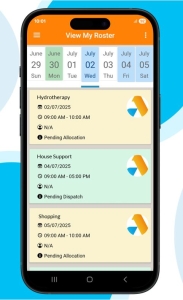
MyAnglicareTas App has been designed to allow our clients and family members to stay connected with our organisation.  It is simple and easy to use.

Acquired Injury Support Services

4 easy steps to access

  1. Contact the Anglicare Tasmania Acquired Injury Support Services team on 1800 017 718 to set up your account.
  2. Download MyAnglicareTas App for free from the Apple App Store or the Google Play Store. Use the links below to be directed to the correct Play Store.
  3. Enter your mobile number to be sent a 6-digit code to use as the password to log into the App.
  4. Start connecting!

Need help connecting?

Let our Support Team assist you. Reach out by phoning 1800 017 718

MyAnglicareTas App on Google Play

‎MyAnglicareTas App on Apple Store


MyAnglicareTas App enables you to

  • View Your Roster: View your support schedule in the app to see which support worker is rostered on for each shift.
  • Stay Informed: Access communications from Anglicare Tasmania and keep up to date with any changes or news.
  • Provide Feedback Easily: Give feedback quickly and easily, helping us improve our services.
  • Puzzles & Games: Enjoy a range of puzzles and games right at your fingertips.
  • Family Access: Allow your family to view your support schedule by giving them access to the app, making it easier to stay on top of everything together.

MyAnglicareTas App User Guide

We have a downloadable User Guide if you would like some more detailed instructions on how to use the App.

DOWNLOAD FULL USER GUIDE DOWNLOAD QUICK USER GUIDE


Frequently Asked Questions

  • Can MyAnglicareTas App run on my phone? What phones are supported?

    MyAnglicareTas app supports Apple iPhones versions 6s and above and Android 7 and above.

  • I do not have MyAnglicareTas App on my device?

    Refer to our Anglicare Tasmania Website MyAnglicareTas app page for download app instructions from your relevant device’s play store.

  • I cannot log into MyAnglicareTas App on my device?

    Refer to our Anglicare Tasmania Website MyAnglicareTas page ‘Log In’ instructions for more information on login details. You will need to contact Anglicare Tasmania to ensure your login details have been created.

  • Will Anglicare Tasmania help with training?

    Yes, our Anglicare Tasmania Support Team can answer any questions you have. Contact them on 1800 017 718 or email schedulingrequests@anglicare-tas.org.au. Or ask your support worker when they next visit you at home.

  • Who can I contact for help?

    Please reach out to our Support Team by emailing schedulingrequests@anglicare-tas.org.au or call 1800 017 718.

  • Who can access my information on the app?

    Only those that you have given us your permission to add or you have personally invited via onto the app will have visibility of your information on the app.

  • I cannot get the App to install and log in on my phone.

    Please check that your phone’s software is up to date and that your phone is supported (iPhone 6 and above or Android 7 and above). If you cannot find the app in your store, search for ‘MyAnglicareTas App’ Have you been supplied with login details? If not, please check with Anglicare Tasmania office.

  • What should I do if I have forgotten my login?

    Your login is your mobile phone number and a One Time Password will be sent via SMS. Please contact our service team on 1800 017 718 if you require assistance with your password.

  • What does adding a family member mean?

    In the MyAnglicareTas App, family members who have been designated as next of kin see an extra button, which allows them to create accounts for family members who can then log in to the MyAnglicareTas App.

  • Who can add additional family members?

    Family members, who have been designated as the Next Of Kin have the ability to, also add additional family members.

  • How am I designated as the Next Of Kin?

    You will need to make a request to your Anglicare Tasmania office.

  • Can we have more than one Next Of Kin?

    No, only one family member is designated as the next of kin. If requested another family member can be designated as the next of kin. You can complete this on MyAnglicareTas app by selecting the Enquiries tile under Contact Us on the home page.

  • Will the app have new features added in the future?

    Yes. We will continually look to add new features and improvements to the app. We welcome any feedback or suggestions you have. Contact your Anglicare Tasmania office via email or phone or use the Contact Us > Feedback tile to send us a brief text message.

  • What is the latest news at Anglicare Tasmania?

    All of our latest news stories are automatically shared to our MyAnglicareTas App and you will get a notification every time this happens. All of our news can be viewed under What’s Happening on our home page.

  • How do I change or cancel my services?

    You can request a change or cancellation of service by contacting our Scheduling team on 1800 017 718

  • What happens when I submit feedback from the app?

    Your feedback will be sent to Anglicare Tasmania who will contact you to follow up.

Enquire onlineContact us

Please fill in this form and a representative of Anglicare will reply to your message within two working days. Be sure to provide your complete contact details so we can respond to you.

Click the button below to visit our contact page

Contact us

Or, phone us on

1800 243 232